

Customers
Create and manage customers, VAT check, credit limit, customer portal, service report, requests, satisfaction and privacy requests.
Customers has these tabs: All customers, Requests, Quotations, Rates, Cost calculator, Diesel index, Satisfaction and Privacy requests. Quotes, rates, the cost calculator and the diesel index are on the page Quotes and rates.
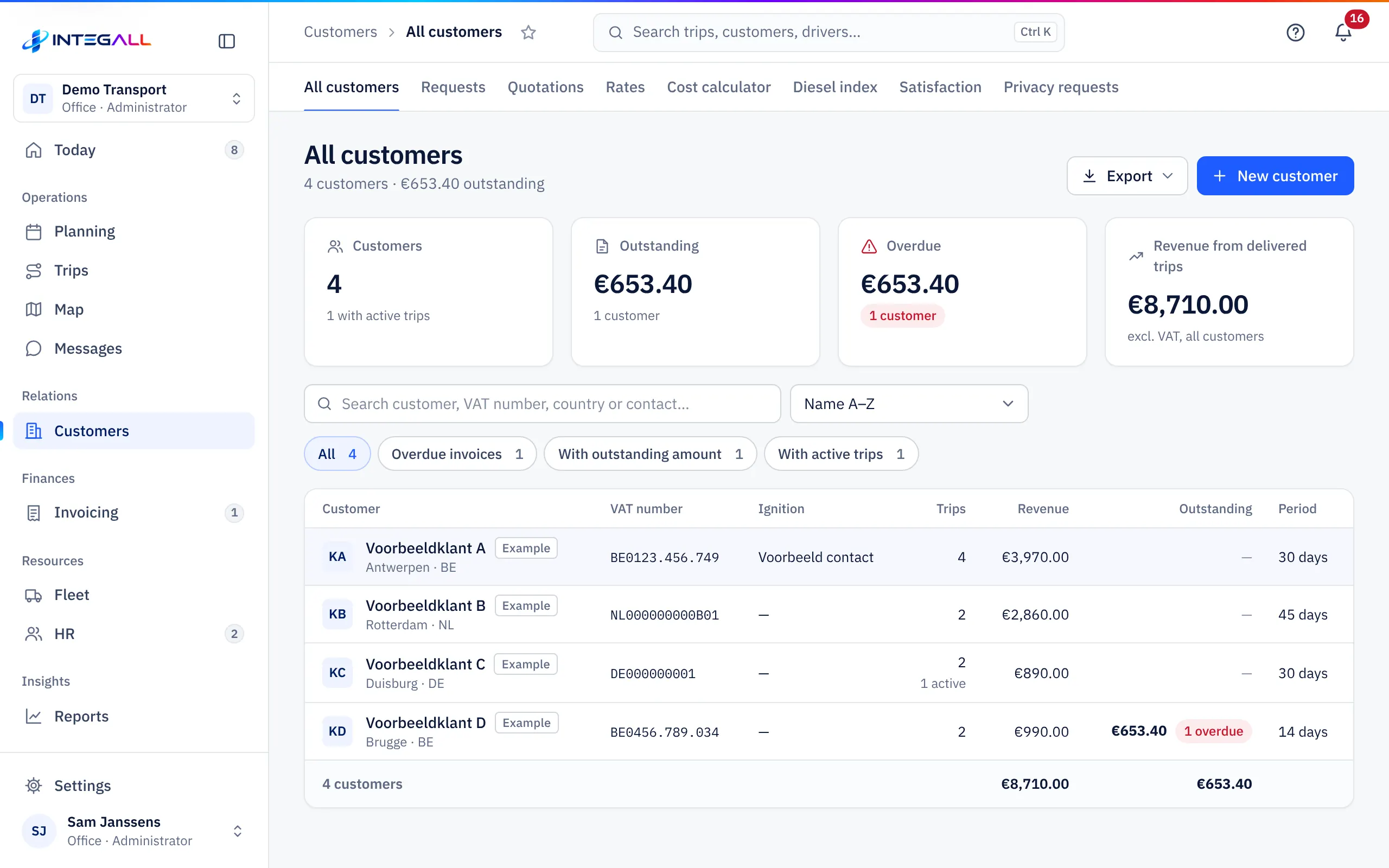
The customer list#
At the top: the number of customers, the open and overdue amount and the revenue of delivered trips. Sort by Name A–Z, Highest outstanding, Highest revenue or Most trips, and filter on Overdue invoices, With outstanding amount or With active trips. The columns are Customer, VAT number, Ignition, Trips, Revenue, Outstanding and Period. Export downloads the list.
Create a customer#
- Choose New customer.
- Enter the Company name *, the Country (ISO) and the VAT / company number. Belgian numbers are checked (modulo 97). Check in VIES checks the number in the European VAT register.
- Enter the Contact person, Phone and Billing email.
- Choose the Payment term (days) (legal default 30 days) and how you invoice: All delivered trips together, One collective invoice per month or One invoice per trip.
- Optionally fill in: Credit limit (€), Invoice language, Peppol-ID, Fuel clause (diesel surcharge on invoices), E-mail for shipment notices, Billing address, Pallet exchange (empties returned) and Notes.
- Choose Save.
Two tick boxes control the automatic e-mails per customer: No automatic shipment e-mails and No automatic payment reminders.
The customer record#
At the top the record shows Outstanding, Overdue, Revenue and Trips, with the buttons Edit and + Trip for this customer. Below:
- Details: VAT number with check, payment term, contact, Peppol ID and address. Check in VIES now checks the VAT number again.
- Invoices: the customer's invoices with their status.
- Credit and statement: open and running amount against the credit limit, and the Statement of account (PDF).
- Customer report: revenue, margin and payment term of the customer over a period. The customer sees the same figures in the customer portal.
- Customer portal: access for the customer (see below).
- Service report: a monthly report for the customer in their language with number of trips, punctuality, delivery without reservations, kilometres and CO₂, as PDF.
- Rates, Quotes and Trips of the customer.
The customer portal for your customer#
Your customer can follow shipments, get documents and invoices and request transports in the customer portal. There are two ways:
- Portal link: with Create portal link the customer gets their own link. With it the customer sees, without signing in, their shipments with CMR and delivery photos, their invoices and payment status, and can request new transports.
- People with their own login: under Access to the customer portal you add people of the customer with Name, E-mail address, Customer's language and Role (Customer administrator or User), and choose Add and invite. The person signs in on customer.integall.com. An administrator of the customer invites colleagues themselves and chooses what they see. An invitation is valid for 7 days.
Requests#
Requests are transport requests from customers through their portal and from new customers through the form on your website.
- Form for your website: under Request form for your website choose Copy link or Copy HTML code and put the link on your website (for example a Request a quote button). New customers fill in the form without signing in.
- Handling: open a request. Accept and create trip creates a trip right away with the data of the request. If the customer is new, first create the customer (Create customer) or link the request to an existing customer. Reject rejects the request with a reason the customer sees.
- Filters: New, Handled and All.
Requests can also come in through the API.
Satisfaction#
After delivery, the tracking page asks the customer for a score from 1 to 5 stars and a comment. Satisfaction shows the average score, the share of satisfied and dissatisfied customers, the comments, the distribution and the score per customer, over This month, 3 months or 12 months. Send the tracking link with every trip to get as many responses as possible.
Privacy requests#
Privacy requests are requests from customers through the customer portal: access, correction, erasure, restriction or objection. You answer within 30 days. Filters: Open, Handled, Rejected and All.