

Staff and drivers
Manage employees and drivers with nicknames, documents and expiry dates, app login, driving times, leave and availability.
HR has these tabs: Employees, Driving times, Leave, Availability, Payroll, Bonuses, Dimona, Fines, Expenses and Subcontractors. Payroll, bonuses, Dimona, fines and subcontractors are on Payroll, fines and subcontractors, expenses on Expenses.
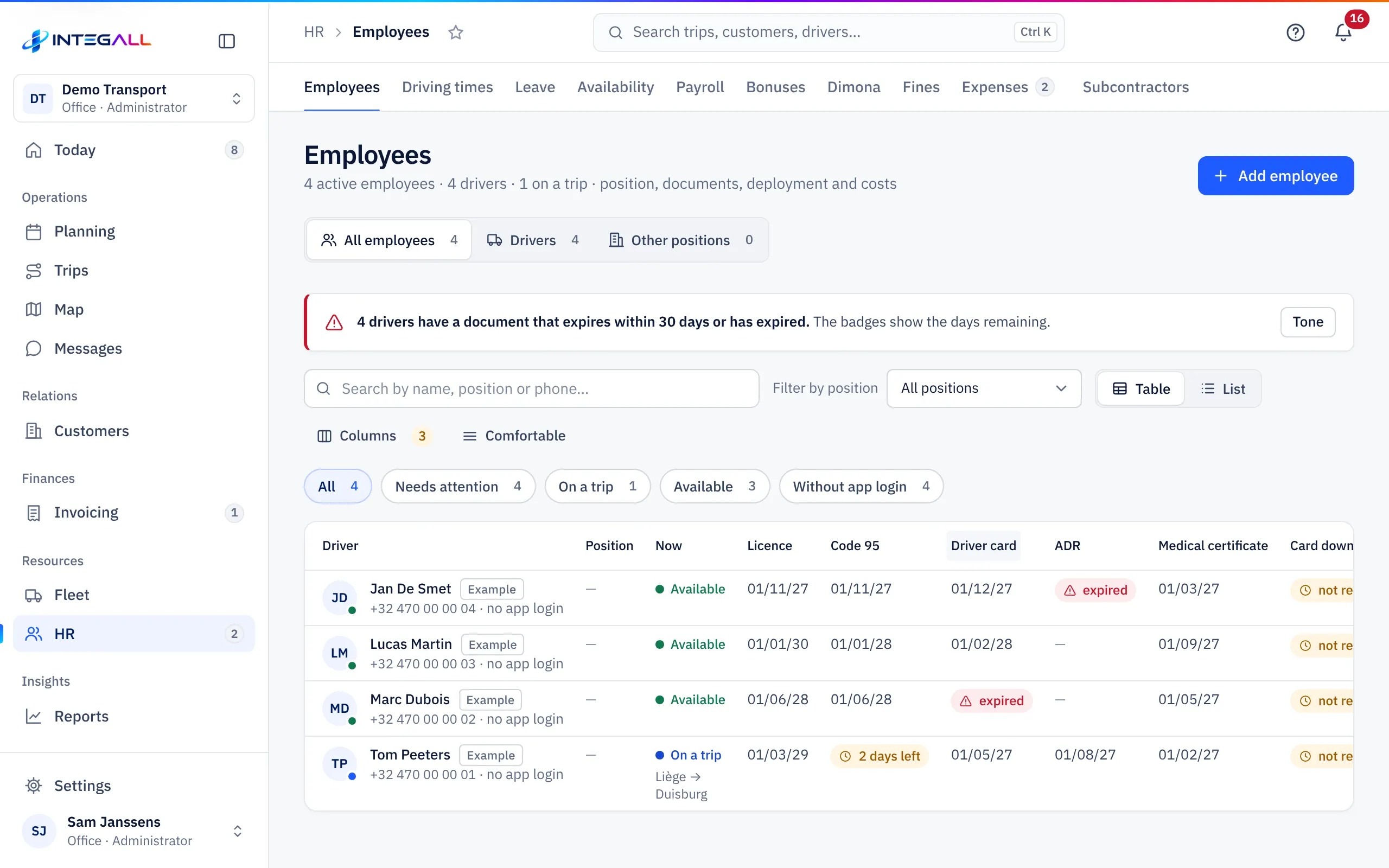
Employees#
The list shows all employees, with the filters All employees, Drivers and Other positions, and All, Needs attention, On a trip, Available and Without app login. The columns show per driver what they are doing now and the expiry date of Licence, Code 95, Driver card, ADR, Medical certificate and Card download.
Add an employee#
- Choose Add employee.
- Enter the Name *, optionally a Position (only the job title), Mobile, Email, Nationality and Employed since.
- Fill in Nicknames (see below).
- Choose the Contract type: Permanent, Fixed term, Temporary agency worker, Student worker, Flexi-job or Self-employed, with Contract end for a temporary contract.
- Under Documents and expiry dates fill in the expiry dates: ID card / residence permit, Driving licence C/CE, Code 95 (CPC), Driver card (tachograph), ADR certificate and Medical certificate (group 2).
- Under Pay details (default) fill in the Gross monthly salary (€) and the Daily subsistence allowance (€).
- Optionally choose a Team, leave Currently employed ticked and choose Save.
INTEGALL warns on the dashboard and in the planning when a document expires. A driver with an expired document gets a warning in the planning.
Nicknames#
In Nicknames you enter how you call this person, separated by commas (at most 10). INTEGALL AI also recognises the driver by these names, for example when you write Ali does this tomorrow. The nicknames stay within your company. Duplicate names are saved once; an empty field clears the nicknames.
A driver's record#
The record has the tabs Overview, Data and Claim, with Call and Absence at the top.
- Overview: trips and expenses this month, open fines, the current trip, the documents with expiry dates and the driver card download.
- Details: all fields and the app login.
- File: recent trips, expenses and fines, leave, damage files and documents.
App login for drivers#
A driver signs in with a username and password and only sees their own trips, expenses and pay overview.
- Open the driver's record.
- Under App login there is a suggestion for the Username; change it if you like.
- Enter a Password.
- Choose Create login.
- Give the username and password to the driver personally, with the address chauffeur.integall.com.
Forgotten password? Under App login, enter a New password and choose Change password. With Remove login the driver can no longer sign in.
Tachograph and driver card#
The driver card must be downloaded at least every 28 days (Regulation (EU) 581/2010). Record every download in the record with Record download. The Card download column shows who is almost late.
Driving times#
Driving times shows the estimated driving time per driver based on the distance of the trips, checked against the European rules (Regulation (EC) 561/2006). The estimate uses the Average speed for driving time (km/h) from the company settings. Per day and per week, with Violations (infringements).
The main rules are on the page: max. 9 h driving per day (twice a week 10 h), max. 56 h per week and 90 h per 2 consecutive weeks, after 4.5 h driving at least 45 min break, daily rest 11 h and weekly rest 45 h.
Leave#
Leave shows holidays, sickness and other absences per driver in a monthly overview.
- Choose Absence or click an empty cell to add an absence. Kinds: Holiday, Sickness, Short leave, Training and Other.
- A blue cell means a trip; a warning on a coloured cell means a trip during the absence. Such a trip also appears among the points of attention.
- Drivers request leave in the app; you see requests at the top under Requests.
- The yearly overview counts the days absent per driver and per kind.
Availability#
Availability shows who and what is free in the next two weeks: drivers with trips and absences, vehicles with trips, maintenance and blocks. Click a free cell next to a vehicle to plan a trip right away. A 2 means two trips on the same day; Geblokkeerd (blocked) means an urgent defect or an expired inspection or insurance.