

Tracking shipments
Your shipments and their timeline in the portal, the tracking link without sign-in, the proof of delivery and giving a rating.
Your shipments#
Under Shipments are all your shipments with trip number, status, route and dates. A shipment that is late gets the label Delayed. With Excel (CSV) you download the list.
The status of a shipment is Planned, Loading, On the way or Delivered.
The timeline#
Tap Timeline on a shipment. You see what happened, with the time: shipment created, driver and vehicle assigned, order confirmed by the driver, arrived, loaded, departed, border crossed, delay reported, delivered and signed.
A question about a shipment#
With Ask a question on a shipment you start a conversation with the carrier about that shipment. See Messages.
Cancelling#
A shipment or request that has not left yet can be cancelled with Request cancellation. The carrier decides; there may be costs according to your agreements.
The tracking link without sign-in#
Your carrier can share a tracking link per shipment, for example in the departure e-mail. With that link you follow the shipment without signing in. You see the status, the schedule and, after delivery, the proof of delivery with signature, CMR and delivery photos. You do not see prices or internal notes.
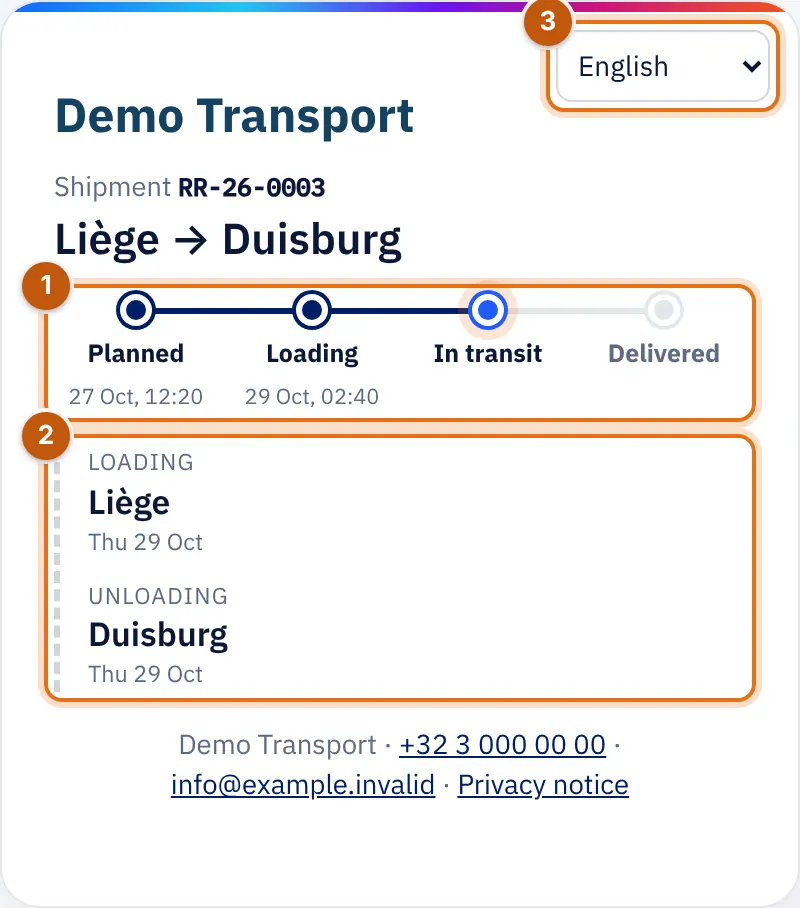
- The status (Planned, Loading, In transit, Delivered) with the time.
- The stops: loading and unloading, with place and date.
- The language of the page.
If the carrier has turned on live location for you, you also see where the shipment is now. It is off by default.
After delivery#
- You receive (if that e-mail is turned on) an e-mail at delivery, with the name of the receiver and the CMR and delivery photos attached.
- On the tracking page you give a score of 1 to 5 stars and a comment. That way the carrier knows how satisfied you are.
Reports#
Under Reports you see the figures of your shipments over a period (3 months, 6 months, 12 months, This year, Previous year or Other period): trips, delivered on time, CMR without reservation, kilometres, weight transported, pallets, amount invoiced, payment term and an estimate of the CO₂ emissions. The same figures as in the carrier's report. You only see amounts with the Invoices permission.