

Vehicles
Manage tractors, trucks and trailers, with inspection, insurance, tachograph calibration, maintenance, documents and tachograph download.
Fleet has these tabs: Vehicles, Workshop, Fuel card, Toll, Damage and Warehouse. Workshop and damage are on Maintenance and damage, fuel card and toll on Expenses.
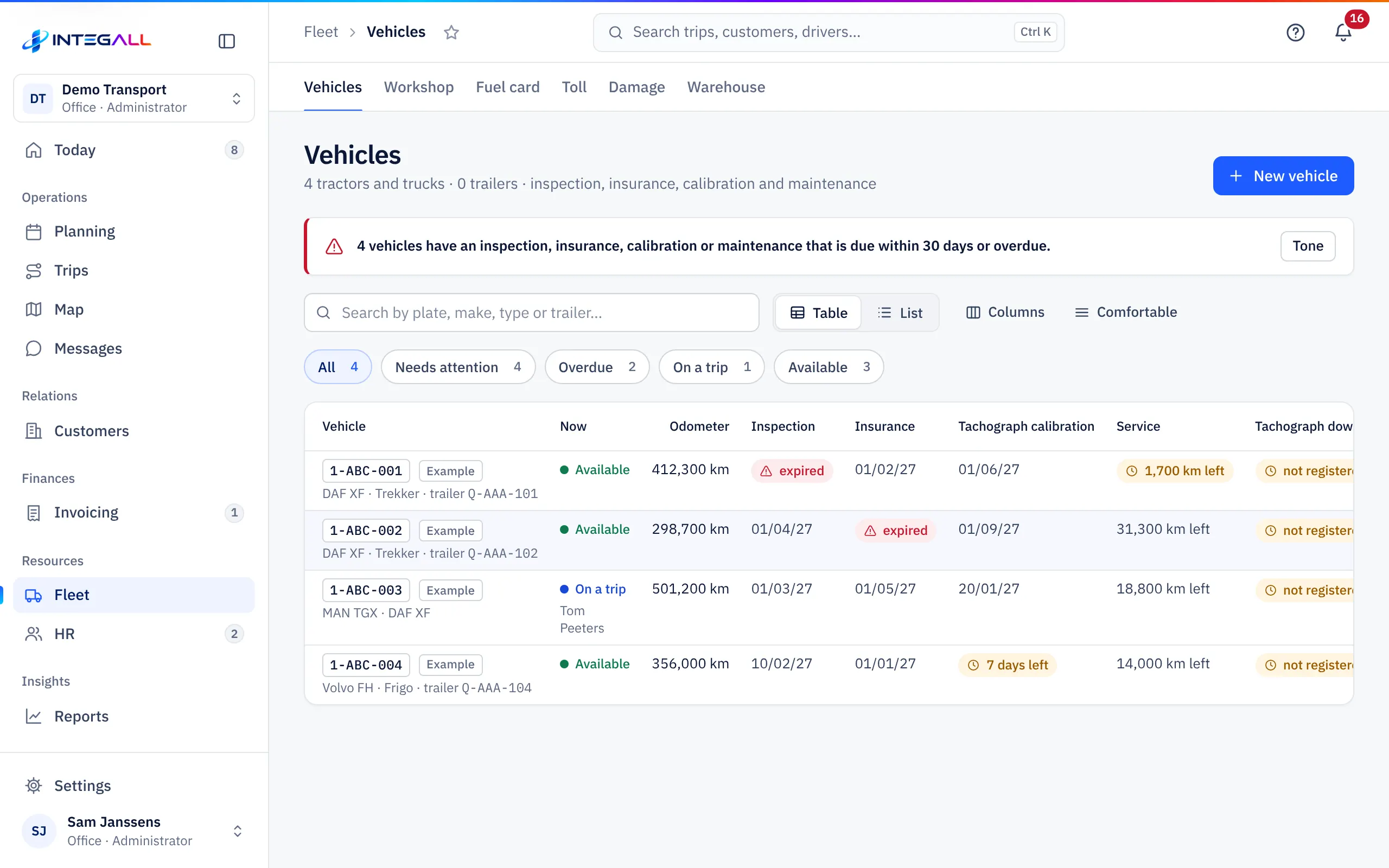
The vehicle list#
At the top you see how many tractors, trucks and trailers you have, and a message when an inspection, insurance, calibration or maintenance expires within 30 days or has expired.
- Filters: All, Needs attention, Overdue, On a trip and Available.
- Tone: Table or List; Columns and Comfortable adjust the table.
- Columns: Vehicle, Now, Odometer, Inspection, Insurance, Tachograph calibration, Service, Tachograph download and Costs this month.
Add a vehicle#
- Choose New vehicle.
- Enter the Licence plate * and choose the Type: Tractor / truck or Trailer.
- Choose the Type (Tractor unit, Truck, Van, Refrigerated truck or Trailer) and fill in Make / model, Year built, Odometer and Euro standard.
- For a tractor: the usual Trailer (Q plate).
- Fill in the Viapass OBU number (Belgian kilometre charge ≥ 3.5 t) and the Fuel card number; they are used to import toll and fuel card files.
- Under Inspection, insurance and maintenance, fill in the dates: Technical inspection, Insurance expires, Tachograph calibration, Next service and Next service at km.
- Optionally choose a Team and write Notes.
- Choose Save.
Many vehicles at once? Import them from Excel via Import.
The vehicle record#
The record has the tabs Overview, Data and Claim.
- Overview: odometer, costs this month, next maintenance, and a list of inspection, insurance, tachograph calibration and maintenance with their status (valid, expiring soon, expired).
- Details: all fields; Edit opens the form.
- File: maintenance history, damage files, purchase invoices and documents of the vehicle.
Report damage and Document at the top quickly add damage or a document.
Not usable#
If the technical inspection or the insurance has expired, or there is an urgent defect, the vehicle shows as Niet inzetbaar (not usable, blocked) in the planning.
Tachograph download#
The mass memory of the tachograph must be downloaded at least every 90 days (Regulation (EU) 581/2010). Record every download with Record download; INTEGALL warns you when the next download is due. For driver cards (every 28 days) see Staff.
Odometer#
Drivers enter the odometer reading from the app (Odometer). With a GPS device the reading also comes from Telematics. The odometer decides when the next maintenance is due.
Warehouse#
Warehouse manages stock per location and lot: receipt, issue, move and count. Stock can never go below zero.