

The driver app
What the INTEGALL driver app does, the two versions of the app and what you need.
The driver app is your workplace on the road: today's trips, the steps when loading and unloading, photos and CMR, expenses, the odometer and contact with the office. You open it on chauffeur.integall.com, on your phone.
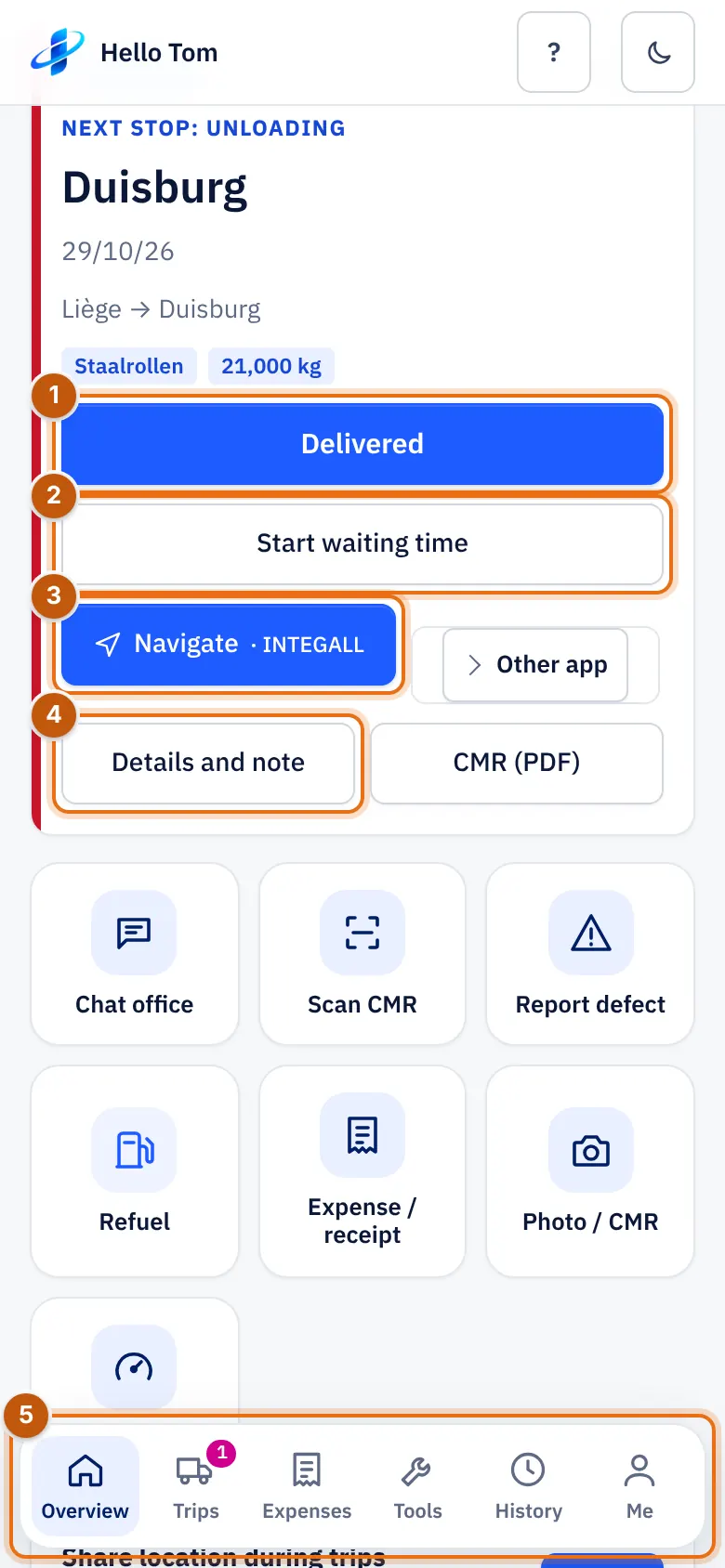
- The next step of your trip, here Delivered.
- Start waiting time.
- Navigate.
- Details and note: the full trip.
- The tabs Overview, Trips, Expenses, Tools, History and Me.
What you need#
- A smartphone (iPhone or Android) with a recent browser.
- A username and password from the office.
- Mobile internet. Without network the app keeps working and your steps are sent later.
Two versions#
| Version | What | How to open |
|---|---|---|
| The full app | Everything: trips, expenses, tools, history, your documents, pay overview, leave. | chauffeur.integall.com |
| The new driver app | A small, fast app for the road: trips, steps, departure check, SOS, messages, expenses and your folder. Also works without network. | Tap New driver app in the full app |
Both versions use the same login and the same data. From the new app you go back with Full app.
The parts of this manual#
- Install the app on your home screen.
- Sign in and today's trips.
- Steps on the road: loading, departing, waiting time, delivering, departure check.
- Photos, documents and CMR.
- Expenses and odometer.
- Messages, calls and SOS.
- Notifications, offline, language and night mode.